
Restbus Simulation
The PyRbs Python class connects your application logic with timers, CAN messages, signals, state machines, and system variables. React to changes and updates without learning a proprietary programming language.
1from pyrbs import PyRbs, CanMessage, Timer23rbs = PyRbs(dashboard=True, log_all=True)45timer_100ms: Timer = rbs.timer.add("timer_100ms", 0.1, active_on_start=True)67msg_control_01: CanMessage = rbs.can_message.get("CAN1.Control_01")89@rbs.timer.on("timer_100ms")10def on_timer_100ms(self: Timer):11 msg_control_01.send()12Create your event-driven restbus simulation
PyRbs decorators expose the events taking place behind the scenes: CAN message reception and transmission, signal updates, timer events, state-machine changes, and service events from diagnostic protocols such as UDS or CANopen.
Keep the code focused on the behavior of the device under test while pyCANdo handles the timing and CAN communication around it.
1temp_avg = rbs.sysvar.add("temp_avg", 0.0)2temp_1_mapped = rbs.sysvar.add("temp_1_mapped", 0.0)345@rbs.can_message.on("CAN1.Measurement_01")6def on_measurement_msg(self):7 temp_avg.value = np.average(np.array([8 self[f"Temperature_0{x}"] for x in range(1,5)9 ]))101112@rbs.sysvar.on_change("temp_avg")13def on_temp_avg(self):14 if self.value > 55:15 print("over temperature warning!")161718@rbs.can_signal.on_update("CAN1.Measurement_01.Temperature_01")19def on_temp_2_update(self):20 temp_1_mapped.value = self.phys2122Configure a simulation
Describe CAN communication with familiar DBC or ARXML files. TOML configuration files define the channels and project setup, while requirements.txt keeps the Python dependencies reproducible.
The complete simulation remains a transparent collection of text-based files that can be reviewed and versioned with Git, as well as edited by modern AI.
1my_restbus2├── config3│ ├── config.toml4│ ├── can.toml5│ ├── can1.dbc6│ ├── can2.arxml7│ └── requirements.txt8├── dashboards9│ └── control_panel.json10├── rbs11│ ├── __init__.py12│ └── main.py13└── readme.md1415161[CAN1]2hw_channel = 13hw_vendor = "pcan"4alias = "InputCAN"5db = [ "./can1.dbc" ]67[CAN1.hw.nominal]8brp = 29tseg1 = 6310tseg2 = 1611sjw = 1612tsam = 1613bitrate = 500_00014sample_point = 8_00015tq = 2516bitrate_real = 01pyrbs==0.2.382pyrbs_core==0.1.873pandas4scipy56789101112131415161BO_ 512 Measurement_01: 8 Vector__XXX2SG_ Temperature_04 : 56|8@1+ (0.5,-40) [-40|87.5] "" Vector__XXX3SG_ Temperature_03 : 48|8@1+ (0.5,-40) [-40|87.5] "" Vector__XXX4SG_ Temperature_02 : 40|8@1+ (0.5,-40) [-40|87.5] "" Vector__XXX5SG_ Temperature_01 : 32|8@1+ (0.5,-40) [-40|87.5] "" Vector__XXX6SG_ Voltage_02 : 16|16@1+ (0.01,0) [0|655.35] "" Vector__XXX7SG_ Voltage_01 : 0|16@1+ (0.01,0) [0|655.35] "" Vector__XXX8BO_ 256 Control_01: 7 Vector__XXX9SG_ Activate : 52|1@1+ (1,0) [0|0] "" Vector__XXX10SG_ D_Value : 40|12@1+ (0.01,0) [0|40.95] "" Vector__XXX11SG_ I_Value : 28|12@1+ (0.01,0) [0|40.95] "" Vector__XXX12SG_ P_Value : 16|12@1+ (0.01,0) [0|40.95] "" Vector__XXX13SG_ Target_Speed : 4|12@1+ (1,0) [0|4095] "rpm" Vector__XXX14SG_ Mode : 0|4@1+ (1,0) [0|15] "" Vector__XXX1516Multiply your simulation
When a test bench contains several devices under test, profiles define only the differences from a shared base configuration. A project can therefore scale to a multi-DUT setup on one pyCANdo device without duplicating the entire simulation in case each device needs its own independent RT Runtime.
1my_restbus2├── config3│ ├── profile4│ │ ├── DUT1.toml5│ │ └── DUT2.toml6│ ├── config.toml7│ ├── can.toml8│ ├── can1.dbc9│ └── requirements.txt10├── dashboards11│ └── control_panel.json12├── rbs13│ ├── __init__.py14│ └── main.py15└── readme.md161[CAN.CAN1]2hw_channel = 134[SYSVAR]5logfile_name = "DUT1"6789101112131415161[CAN.CAN1]2hw_channel = 234[SYSVAR]5logfile_name = "DUT2"678910111213141516State machines
Use the Python statemachine package to describe the application logic. Event decorators such as @rbs.state.on_enter can change timers, message transmission, or signal values as the machine moves between states.
The same definition can be converted into a Mermaid diagram, keeping the implemented behavior and its visual documentation closely aligned.
Explore the state-machine example →1from statemachine import StateMachine, State, exceptions23class ControllerTargetStates(StateMachine):4 sleep = State("sleep", initial=True)5 standby = State("standby")6 speed = State("speed")7 torque = State("torque")89 to_standby = sleep.to(standby) | speed.to(standby) | torque.to(standby)10 to_speed = standby.to(speed)11 to_torque = standby.to(torque)12 to_sleep = standby.to(sleep)13 to_save_state = sleep.to(standby) | speed.to(standby) | torque.to(standby)1415 def change_state(self, sel_state: int) -> None:16 if self.current_state == self.state_from_value(sel_state):17 return1819 try:20 match sel_state:21 case 0:22 self.to_sleep()2324 case 1:25 self.to_standby()2627 case 2:28 self.to_speed()2930 case 3:31 self.to_torque()3233 except exceptions.TransitionNotAllowed:34 self.to_save_state()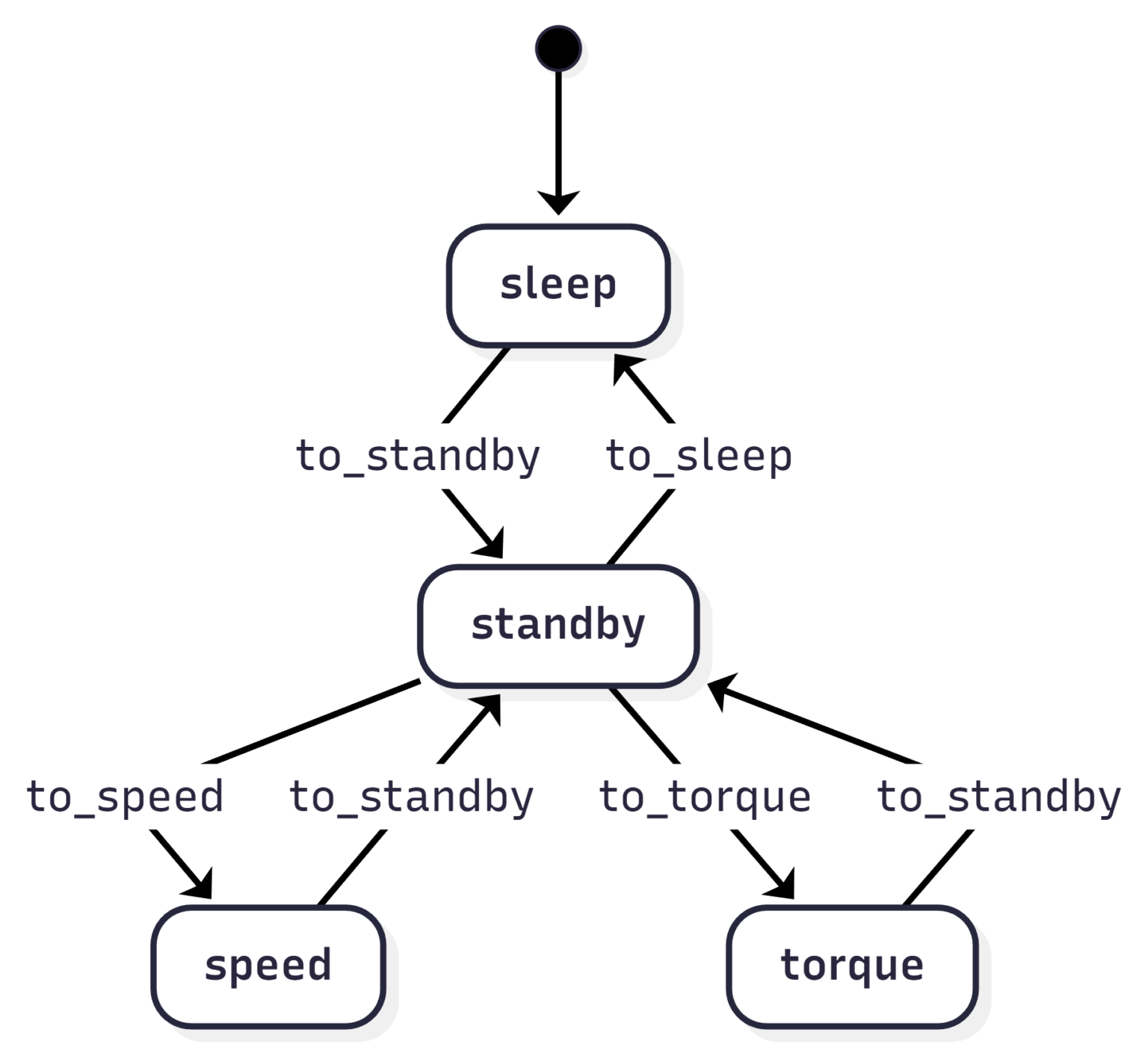
1from pyrbs import PyRbs, CanMessage, CanSignal, SysVar, Timer2from control_states import ControllerTargetStates34rbs = PyRbs(dashboard=True, log_all=True)5ctrl_state = rbs.state.add_statemachine(6 "ctrl_state", ControllerTargetStates7)89@rbs.state.on_enter("ctrl_state", "sleep")10def on_enter_sleep(self: ControllerTargetStates):11 select_mode.value = 012 timer_100ms.stop()1314@rbs.state.on_exit("ctrl_state", "sleep")15def on_exit_sleep(self: ControllerTargetStates):16 timer_100ms.start()1718@rbs.state.on_enter("ctrl_state", "standby")19def on_enter_standby(self: ControllerTargetStates):20 select_mode.value = 121 msg_control_01["Mode"].raw = 02223@rbs.state.on_enter("ctrl_state", "speed")24def on_enter_speed(self: ControllerTargetStates):25 msg_control_01["Mode"].raw = 12627@rbs.state.on_enter("ctrl_state", "torque")28def on_enter_torque(self: ControllerTargetStates):29 msg_control_01["Mode"].raw = 230Common questions about pyCANdo
Isn't Python is a slow programming language?
PyRbs keeps the performance-critical work outside of your business logic. The heavy lifting is implemented in Rust in the background.
Is real-time behavior possible with pyCANdo?
Linux preemption, core isolation, and other system-level measures are used to make response times accurate and predictable.
Can I use any Python package?
Most packages fit naturally, including NumPy, Polars, pandas, and SciPy. Blocking requests or custom asynchronous threads should not run directly inside an @rbs event handler.
How many simulations can run in parallel?
The available CPU cores determine the number of parallel running simulations. Three cores are typically reserved for utilities and real-time services; each remaining core can run an additional simulation.
Can i use my CAN Interfaces on multiple Simulations at the same time
Yes, Interfaces can be shared as well as locked exclusivly for one Simulation.